

What is Express Checkout? Apple Pay, Google Pay, and One-Tap Payments Explained
Filling out checkout page forms, especially on mobile devices, is one of the primary factors that lead to cart abandonment. Every extra input box asks a busy customer to pause, type on a small touchscreen keyboard, and look up card or address details. An express checkout payment method resolves this bottleneck and drastically reduces friction because buyer authentication is already verified and shipping and billing data are pre-saved on the client's device.
While AI-driven agentic shopping, where autonomous bots initiate and complete purchases on behalf of consumers, may eventually influence how online payments work and develop in the next few years, that technology is still in its early days. It will take noticeable time before AI agents capture a significant share of global purchases and challenge one of the most convenient checkout flows of the past decade. For merchants focused on growing revenue right now, understanding and implementing accelerated wallet payments remains essential.
What is express checkout?
In practical terms, express checkout is a payment method category that relies on known, pre-verified, and encrypted data already stored on customer’s smartphone, browser, or digital account to complete the transaction. Rather than requiring the buyer to type out a card number, expiration date, security code, and full street address, sometimes with extra fields for billing details, the purchase is finalized in a single touch, click, or biometric scan via face ID or fingerprint recognition.
Common examples powering modern digital wallet checkout flows include Apple Pay, Google Pay, and browser-based wallets like Link by Stripe, alongside stored-account options such as PayPal. When a customer selects one of these express payment buttons, their device acts as a secure credential vault, supplying both the payment token and the verified delivery address directly to the merchant’s payment processing system.
It is important for store owners to distinguish between express checkout as a broad payment category, essentially an instant wallet living inside your customer’s smartphone, and specific legacy features like PayPal Express Checkout. Today, express checkout refers to any accelerated one click checkout flow designed to bypass manual form entry. By placing these recognizable buttons prominently on product pages, cart drawers, or at the very top of your checkout page, you allow returning and first-time mobile visitors to complete purchase with the payment method they already trust and use daily.
How express checkout works
From a customer's perspective, an express checkout payment is remarkably straightforward, stripping away the multi-screen tedium usually associated with buying online. Behind the scenes, however, a tightly coordinated sequence of tokenization and security checks happens in seconds:
- The buyer taps an express payment button: Whether browsing a product page, reviewing a slide-out cart, or landing on the checkout screen, the customer sees a familiar branded button, such as Apple Pay or Google Pay, and taps it directly.
- Biometric or device security authentication is initiated: The customer’s smartphone or computer immediately triggers a built-in hardware security prompt such as face ID, touch ID, an Android fingerprint sensor, or a device passcode. This confirms that the person holding the device is the authorized wallet owner.
- Data is fetched and shared automatically from a connected wallet: Once biometric verification succeeds, the digital wallet retrieves the client's pre-saved payment token, billing details, email address, phone number, and default shipping address, transmitting them securely to the checkout page.
- The payment is completed: The checkout interface instantly calculates applicable shipping rates and taxes based on the shared delivery address, displays the final order total inside the wallet sheet, and processes the charge as soon as the buyer confirms with one final tap.
Because the wallet shares an encrypted device token rather than the customer’s actual credit card number, the transaction is faster for the buyer and safer for the merchant, reducing exposure to manual entry mistakes and card-testing fraud.
Why express checkout increases conversion
The business case for adding accelerated wallets to your store is backed by global transaction data and real-world merchant testing. According to Checkify internal analytics and data, 85% of checkouts now happen on mobile for its connected merchants. When close to nine out of ten buying sessions take place on a mobile device, optimizing for thumb-friendly interactions is no longer optional. It is one of the core drivers of profitability.
Global adoption numbers show a similar trend and confirm that consumers actively prefer mobile-oriented payment options over entering their card numbers:
- Digital wallets process 54% of all online transactions in the world (TheDroidsOnRoids, 2026), making wallet-based payments the single largest payment category in global e-commerce.
- The total number of digital wallets of different kinds is expected to reach 5.2 billion globally by the end of 2026 (Ringly.io, 2026), meaning virtually every online user carries an active payment wallet.
- Regional adoption reflects this shift across mature e-commerce markets: in Canada, 33% of users who shop online use Apple Pay and 28% use Google Pay for checkouts (Customcy, 2026).
- Controlled experiments demonstrate the direct lift on store revenue: adding an express checkout button by PayPal into the smart cart increased conversion by +37% in an A/B test conducted by Blend Commerce.
The psychological and physical mechanism behind this conversion lift comes down to eliminating mobile typing friction. On a small smartphone screen, manually entering a shipping and or billing address, postal code, email, and a long card number is slow and frustrating. Auto-correct frequently alters street names, while typos cause card declines, and buyers sitting on a couch or commuting often abandon their cart simply because their physical wallet is in another room. When Apple Pay checkout or Google Pay checkout handle both identity and address transfer in one tap, impulse buyers and high-intent customers finish paying before second thoughts set in.
Express checkout vs traditional checkout form
To appreciate why accelerated wallets outperform standard forms on mobile traffic, it helps to compare the exact sequence of actions required from a customer in both scenarios.
A traditional checkout form forces the buyer through at least five distinct, sequential stages. It could be even more, depending on how many custom fields, settings or confirmations a seller requires:
- Contact information: Typing an email address and phone number for order updates.
- Delivery address entry: Filling out first name, last name, street address, apartment or suite number, city, state or province, postal code, and country.
- Shipping method selection: Waiting for carrier rates to load and selecting standard or expedited delivery.
- Payment data entry: Pulling out a physical card to type the 16-digit number, cardholder name, expiration date, CVV code, and confirming whether the billing address matches the shipping address.
- Validation and verification: Submitting the form, waiting for field validation checks, completing a 3D Secure banking challenge (such as an SMS code or banking app approval), and finally reaching the order confirmation page.
If the buyer mistypes a single digit or encounters a slow-loading validation script, the page throws an error and the likelihood of abandonment spikes.
By contrast, an express checkout compresses that entire journey into a rapid exchange:
- One tap and biometric check: The customer taps the wallet button and verifies their identity with a face ID or a fingerprint.
- Instant data exchange and confirmation: Address, contact, and tokenized card details transfer automatically, shipping, tax rates are calculated in real time, and the order confirmation appears within seconds.
Of course, traditional card forms remain essential for buyers who prefer paying with BNPL, transfers, other alternative payment methods, or haven't configured and connected a digital wallet. That is why high-converting checkout layouts usually display express buttons prominently at the top of the screen while keeping a clean, well-structured card form directly underneath.
What about PayPal Express Checkout specifically?
When researching accelerated payments, merchants often encounter the term PayPal Express Checkout and wonder how it relates to Apple Pay or Google Pay. Understanding the product history helps clarify how these tools fit together on an online store.
PayPal Express Checkout is the historic name for a specific feature created by PayPal long before smartphones became primary shopping devices. It offered a simplified checkout flow for PayPal account holders, allowing buyers to click a PayPal button, log into their PayPal account, and authorize payment using the shipping addresses and funding sources already saved inside their PayPal profile. This action skipped the merchant's multi-page or inconvenient registration forms. While PayPal has modernized its button suite over the years, PayPal Express Checkout remains a specific, proprietary product tied to the PayPal ecosystem. It is a somewhat legacy flow compared to hardware-native wallets, yet it continues to be a dependable, high-converting option trusted by hundreds of millions of global shoppers.
Later, Apple and Google introduced an entirely new, device-level category of express and one-tap checkouts. Products like Apple Pay and Google Pay, along with processor-backed wallets such as Link by Stripe, operate directly within the user's smartphone operating system or a web browser using biometric authentication rather than external account logins.
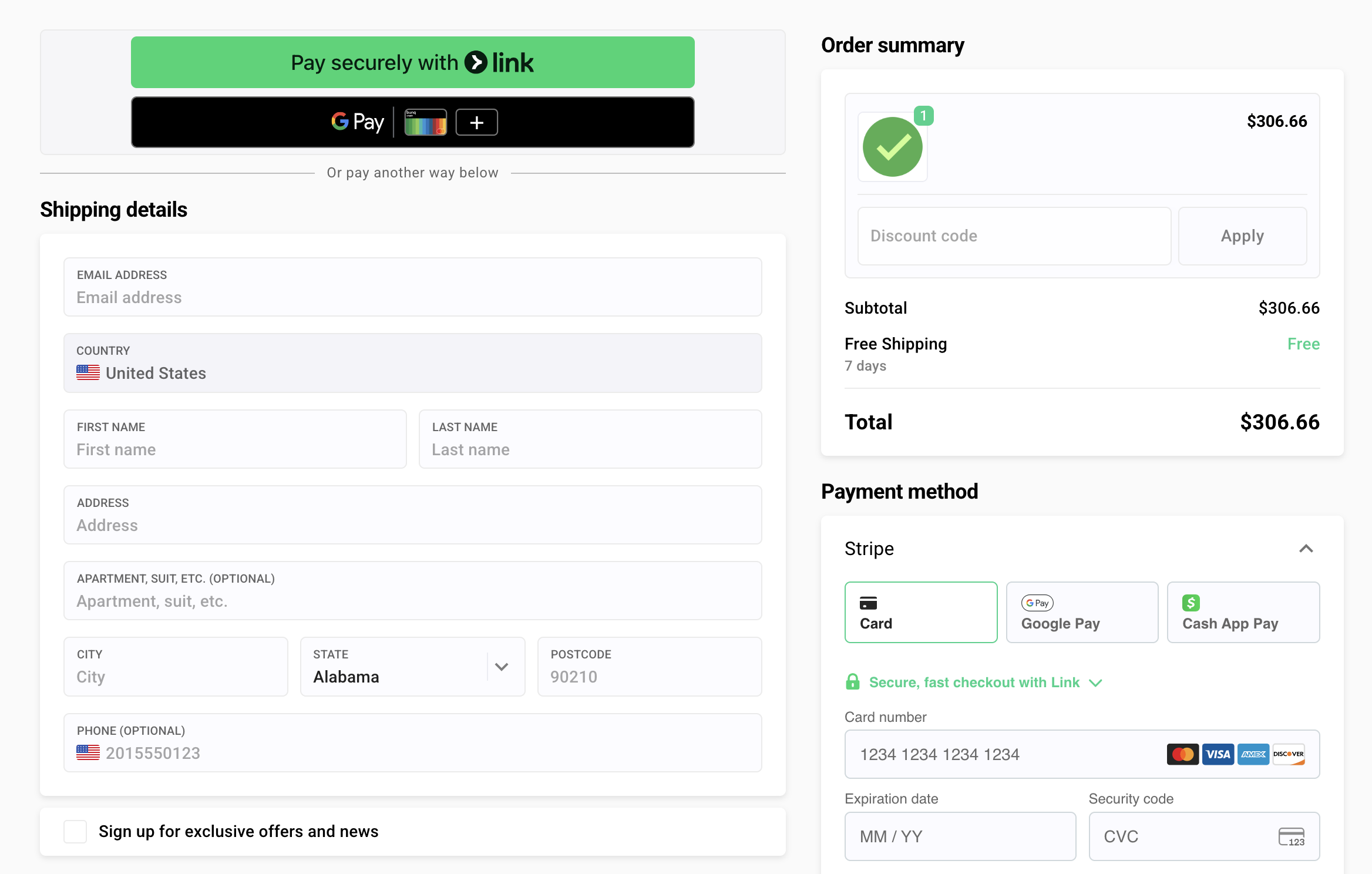
For merchants, these two approaches do not compete. They complement one another. For example, on a checkout page powered by Checkify Plus, PayPal buttons and digital wallets like Apple Pay and Google Pay sit side by side cleanly, letting each buyer choose whichever fast payment method matches their device and personal preference.
How to enable express checkout for your business
Setting up acceptance of payments completed via digital wallets does not require custom development or complex work with API. Checkify provides ready-to-use express buttons for major payment processors, including Stripe and PayPal, allowing you to offer multiple one-tap options on a single checkout page. Therefore, the key step is to have an active, valid and verified account with at least one of them.
Stripe is particularly popular among merchants because it bundles major smartphone wallets under one straightforward integration.
Follow these steps to integrate Apple Pay, Google Pay, and PayPal on your store:
- Activate wallet methods on your processor accounts: Before adjusting your checkout layout, log into your connected Stripe and PayPal merchant dashboards. Verify that digital wallets, specifically Apple Pay and Google Pay inside Stripe, are available for your account and are enabled there.
- Manage settings in the Checkify admin: Open your Checkify Plus admin panel and navigate to
admin > Payment systems > Stripe.Note: PayPal, other providers, are also configured in the same section. Enable the express checkout buttons you want to display. Checkify technologies ensure that Apple Pay domain verification completes automatically for our customers. Normally, no additional actions are required from their side. - Test thoroughly on real mobile devices: Once your settings are saved, open your live checkout link on an actual smartphone. Do not rely solely on a desktop browser window. Because 80-90% of checkouts occur on mobile, checking button visibility, tap spacing, and shipping or tax rates updates on real phone screens is essential.
- Account for device eligibility and involve friends or colleagues: Keep in mind that express buttons render dynamically based on the client's hardware, browser, and active wallet configuration. For example, you will not get an Apple Pay button when testing on a Windows desktop PC or an Android phone, nor will it appear on an iPhone that has no cards added to the Apple Wallet. Therefore, ask friends or colleagues to visit your checkout pages using different combinations. Example: an iPhone with Safari browser, an Android device with Chrome, a MacBook, and a PC on OS Windows. If the live test checkouts are initiated in mass, you can soon get all the confirmations that every button renders and processes cleanly.
{{CTA}}
FAQs
Q: What is express checkout?
A: Express checkout is a one-tap payment method, like Apple Pay or Google Pay, that uses saved customer data to complete a purchase without manually entering payment or address details.
Q: Is express checkout the same as PayPal Express Checkout?
A: Not exactly. PayPal Express Checkout is a specific legacy PayPal feature, while 'express checkout' as a category includes Apple Pay, Google Pay, and other one-tap digital wallet payments.
Q: Does express checkout improve conversion rates?
A: Yes. Removing manual form entry is one of the most effective ways to reduce mobile checkout abandonment, with some A/B tests showing conversion increases of over 30%.
Q: Do I need a developer to add Apple Pay or Google Pay to my checkout?
A: Not with most modern checkout platforms, whether payment processor hosted or custom, these payment options can usually be enabled or disabled with a single toggle in the dashboard.
Conclusion
Adding accelerated wallets removes the biggest mobile typing barrier standing between your paid traffic and completed orders. To see how Apple Pay, Google Pay, and PayPal work together on one page, test the live flow in Checkify Plus Demo mode or connect your payment gateways in minutes.